FebSmart FS-N300 (Wireless N 2.4GHz WiFi Adapter) Driver Download

Last Updated on 04.06.2020 by DriverNew

Download software for the device: IEEE802.11N 2.4GHz 300Mbps  Wi-Fi Card 
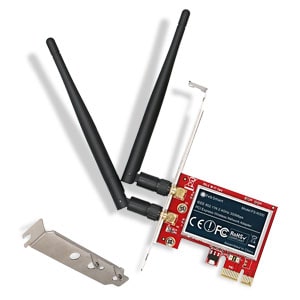
FebSmart FS-N300 (Wireless N 2.4GHz WiFi Adapter) DriverDevice model: FS-N300

Antenna Power: 2X3dBi

Frequency: 2.4GHz

Plug in Interface: PCI Express

Data Rate: 2.4G 300Mbps

FS-N300 will add high speed 802.11 N Wi-Fi connectivity to a desktop computer through a PCI Express (PCIe X1) slot. Allow PCs connect to wireless network at 2.4GHz 300Mbps for office and home use.

System Reqiurements: Windows Server, Windows XP, Windows 7, Windows 8, Windows 8.1, Windows 10 (64-bit / 32-bit); Linux.

NOTE: Please downlaod driver tools if PC can not find wireless card correctly.

Download driver for Windows

Download driver for Linux

Download Driver Tools

Download User Manual

How to download files located on Google Drive:
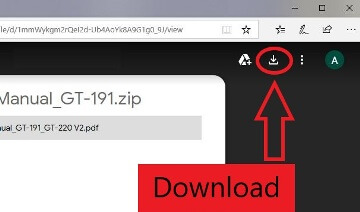
How to download a file

FebSmart Driver DownloadThis is a driver that will allow you to use all the functions of your device. The version of this driver is located on the CD-ROM that is included with the device.

Product Description

FebSmart Wireless N 2.4GHz 300 Mbps PCIe Wireless Network Adapter for Windows 11, 10, 8.1, 8, 7, XP, Server (64-bit / 32-bit) and Linux PCs, PCIe WiFi Card, PCIe WiFi Adapter (FS-N300)

FebSmart FS-N300 Product Description

FS-N300 will add high speed 802.11 N Wi-Fi connectivity to a desktop computer through a PCI Express (PCIe X1) slot. Allow PCs connect to wireless network at 2.4GHz 300 Mbps for office and home use.

Based on Qualcomm Atheros wireless network solution.Packed with 2X 3dBi external antenna to improve wireless network reliability and performance.

Seamless connect to wireless 802.11 ac/a/b/g/n device. Support 300Mbps max throughput on 2.4GHz band. Plug and Play on Windows 8, Windows 8.1, Windows 10 (64-bit / 32-bit) Windows Server 2012 2012R2 2016 2019. Need to Install Driver on Windows XP, Windows 7 (64-bit / 32-bit) Windows Server 2003, 2003R2 2008 2008R2 (64-bit / 32-bit). NOT for Windows Vista System. Linux users refer ATH9K.

Additional Information

If you have problems installing drivers or other software for your device (printer, scanner, monitor, keyboard, etc.), please tell us the model of your device and the version of your operating system (for example: Windows 11, Windows 10 64-bit, Windows 8 64-bit, etc.) and we will try to help you. Email us.

install driverHow to install the driver if there is no setup.exe file and how to install the driver using the .INF file. In this case, open the downloaded file that should contain the driver and use the .INF file to install. In this article, we will tell and show you how to install a driver using an .INF file.
Windows Update and manually adding a printerHow to install a driver for an old printer in Windows 10 and Windows 11. Step-by-step instructions for finding a driver through Windows Update and manually adding a printer. This method may help if the official driver fails to install, is unavailable on the manufacturer's website, or the printer stops working after a Windows update.
Scanner softwareIf you can’t find scanner software or don’t know how to use your scanner to scan documents and photos. This problem occurs because some scanners and multifunction devices only have drivers, but do not have dedicated software to control the scanner.
Solving problems with Xerox printers and MFPs on laptops with Windows 11 ARMHow to fix problems with Xerox printers and multifunction devices on Windows 11 ARM laptops. The article explains why standard Windows x64 drivers may not work and how to install the Xerox Global Print Driver ARM64 for USB or network connections. Alternative methods for printing and scanning are also covered.
Problems that prevent your printer or scanner from workingHow to fix problems that prevent a printer or scanner from working. The article covers common driver installation errors and problems connecting devices via USB. It explains how to properly install or reinstall drivers, as well as how to install a driver using an INF file.

Leave a Reply

Your email address will not be published. Required fields are marked *