Last Updated on 04.06.2020 by DriverNew
Download software for the device: IEEE802.11N Dual Band Concurrent Wi-Fi Card
 Device model: FS-N600
Antenna Power: 2X3dBi
Band: 2.4GHz and 5GHz
Plug in Interface: PCI Express
Data Rate: 2.4G 300Mbps or 5G 300Mbps
System Reqiurements: Windows Server, XP, 7, 8/8.1, 10 (64-bit / 32-bit); Linux.
NOTE: Please downlaod driver tools if PC can not find wireless card correctly.
FebSmart Wireless Dual Band N600 (2.4GHz 300Mbps or 5GHz 300Mbps) PCI Express Wi-Fi Adapter for Windows XP, 7, 8/8.1, 10 Server System (64-bit / 32-bit) Desktop PCs-2-Stream MIMO PCIE Wi-Fi Card (FS-N600)
How to download files located on Google Drive:
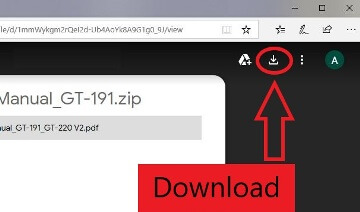
 This is a driver that will allow you to use all the functions of your device. The version of this driver is located on the CD-ROM that is included with the device.
Product Description
Wireless Dual Band N600 PCI Express (PCIe) Wi-Fi adapter
Feb Smart Wireless Dual Band N600 (2.4GHz 300Mbps or 5GHz 300Mbps) PCI Express (PCIe) Wi-Fi adapter with 6dBi External Detachable WiFi antenna is special designed for home and office use PCs Online Gaming and Video Streaming.
Product Specifications:
- Model:FS-N600
- External Antenna Power: 2X3dBi
- Function: Wi-Fi Receiver or Soft AP Mode
- Bracket:Low Profile and Standard Size Bracket
- Wireless Speed: 2.4GHz 300Mbps or 5GHz 300Mbps
- Usage: Online Gaming and video Streaming on Desktop Computer.
Package List:1X FS-N600,1X Mini CD,1X User Manual ,2X3dBi Antennas,1XRetaining Screw,1X Low Profile Bracket

Advance Qualcomm Atheros Wireless Network Adapter
- 1. PCI Express Slot Connection-Share More Stable Signals than USB Wi-Fi Adapters
- 2. Add Wireless Adapter on Desktop Computer-Say Goodbye to Wired Internet Cable, Move Your Desktop Computer to Anywhere You like.
- 3. Low Profile and Standard Profile Bracket Inside–Both Mini and Standard Desktop Host Workable.
- 4. Engineered 2X3dBi Detachable External Antenna-External Antenna to Improve Wi-Fi Coverage and Performance.
- 5. Comply with 64/128 WEP, WPA/WPA2, WPA-PSK/WPA2-PSK (TKIP/AES) Security Protocol-Ensure You Connect to Most of Wi-Fi Signals.
- 6. Build in Qualcomm Atheros Chipset-Select Better Wi-Fi Solution Enjoy Better Wi-Fi Connection,Get Most of Wi-Fi Speed and Few Loss.
- 7.2.4GHz and 5GHz Dual Band Wi-Fi 300Mbps-Seamless connect to wireless 802.11 ac/a/b/g/n products,Share Fast and Stable Internet on 2.4GHz and 5GHz.


Leave a Reply