Last Updated on 22.09.2022 by DriverNew
 Drivers and software for operating systems Windows 11, Windows 10, Windows 8, Windows 8.1, Windows 7, Windows Vista, Windows XP (64-bit / 32-bit)
Printer Model: Samsung CLX-2160N (CLX-2160N/XEV).
Samsung Printer Driver
For Samsung printers in Windows 11, Windows 10, Windows 8.1, Windows 8, Windows 7, Windows Vista, and Windows XP (64-bit / 32-bit), you can use Samsung Universal Print Driver 3. This is a universal Samsung print driver that works with many models and helps you set up printing quickly. For most users, this is the easiest option: download one file, install the driver, and start printing.
Samsung Universal Print Driver 3 is convenient because it supports many Samsung printers and eliminates unnecessary confusion when choosing a file. This is especially useful when several drivers and additional programs are available on the download page, but the user simply needs to install the print driver. After downloading the file, no additional internet connection is required during a standard installation. The driver installation is available in several languages. The installer is usually displayed in the language of the Windows operating system.
You can download the driver using the official direct link. The file is hosted on HP’s official server because support for many Samsung printers is now provided through HP resources.

Download Printer Driver for Windows
Important reminder for USB connection: do not connect the printer to the computer in advance. The installer should prompt you to connect the USB cable at the appropriate moment. This helps avoid a situation where Windows detects the device too early and automatically installs a compatible driver.
How to install the Samsung printer driver: download the driver file using the link above, run the installer as an administrator, accept the license terms, choose the installation type, specify the printer connection method, and wait for the installation to finish.
If you get errors while installing Samsung Universal Print Driver, or if the printer does not work after installation, open the article How to Install Samsung Universal Print Driver 3 If the Printer Does Not Work. It contains step-by-step instructions and solutions to common problems.
This video shows how to install drivers for a Samsung printer.
During installation, the program offers several options.
New Printer — choose this option if you are installing the driver on this computer for the first time. For most users, this is the correct choice.
Existing Printer — choose this option if the printer was already installed before and now you need to find the device again, update the driver, or reinstall it.
Without Connecting the Printer — choose this option if you want to install the driver first and connect the printer later. This is convenient if the device is not connected yet, is not detected automatically, or you want to install the software in advance.
At the next step, you are prompted to choose the printer connection type. USB — if the printer will be connected directly to one computer with a cable. Network — if the printer is connected to a router or local network with a cable. Wireless Network — a wireless connection, that is, via Wi-Fi.
If you have difficulties installing the driver or if the printer does not work correctly after installation, read here about ways to solve such problems.
Samsung Scanner Driver
If you need to scan from your computer, you must also install the scanner driver. The print driver and the scanner driver are different components, so the printer driver alone is not enough. You can download this driver using the following direct link:
Download scanner driver for Windows
Software for using the scanner
Download and install the software: “Easy Printer Manager” and “Easy Document Creator”.
Download software “Easy Printer Manager”
Download software “Easy Document Creator”
It is recommended to install these two softwares as they complement each other. This software is included with your device and is intended to enable you to use all the features of this device. If you only need the software to operate the scanner, then download and install ‘Easy Document Creator’.
Here you can learn more about this software (Easy Document Creator)
If you have problems using this software, you can use the easier way to scan documents and photos.
You can scan using free Windows tools or the NAPS2 app.
Windows Scan is a free app for Windows 11, Windows 10, and Windows 8.1 that you can download from the Microsoft Store and use to scan documents and pictures.
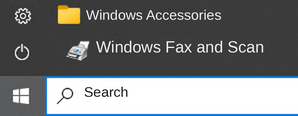
Windows Fax and Scan is a built-in app for Windows 10, 8.1, 8, and 7. To open it, click Start or use Windows Search. In the search box, type: Windows Fax and Scan.
NAPS2 is a free scanning app that lets you save files as PDF, TIFF, JPEG, or PNG and offers more flexible settings.
To learn more about these apps, which one to choose, and how to use them, read this article.
Important: These apps require a scanner driver. If a driver from the manufacturer is available for your model, it is best to install it first. If Windows has already installed a driver automatically and scanning works properly, reinstalling it is usually not necessary.
Printer and Scanner Driver for Samsung CLX-2160N (CLX-2160N/XEV). This is a driver that will provide full functionality for your selected model.



Leave a Reply