Last Updated on 23.04.2025 by DriverNew
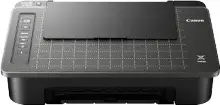 Driver for printer: Canon PIXMA TS308t. On this page of the website you will be able to download all the necessary drivers and software for this printer.
On the official Canon website for the Canon PIXMA TS308t printer, you can download several different files that contain drivers and software. If you have problems with installing these drivers or you do not know which driver to choose for installation, then we recommend downloading and installing the drivers that are in the file: “Printer Driver”. There will be no problem installing these drivers. After installing these drivers, you will be able to use all the functions of your printer.
You can download the file containing all the necessary drivers and software for Canon PIXMA TS308t printer on this page of the website. The file will be downloaded from the official Canon website.

Software for Windows operating systems
Download drivers and software for Windows Canon PIXMA TS308t Printer Driver This drivers and software for operating systems: Windows 11, Windows 10 (64-bit), Windows 10 (32-bit), Windows 8.1 (64-bit), Windows 8.1 (32-bit), Windows 7 (64-bit), Windows 7 (32-bit) |

Software for MAC operating systems AirPrint Canon PIXMA TS308t You do not need to download and install printer drivers for Mac operating system. You can use the “AirPrint” software built into the Mac operating system. With this software, you can print via a wireless local area network (WLAN). |

How to install drivers for printer: Canon PIXMA TS308t. Do not connect the printer to the computer. Start installing the software first. During the installation process, a message will appear on the monitor informing you when to connect the printer to your computer.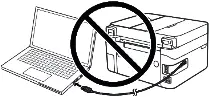 If you see the message ‘Found New Hardware’ on the screen, click Cancel and disconnect the USB cable. Then proceed to install the software. A common mistake when installing a driver is that you first connect the device to your computer using a USB cable and then install the driver. In this case, the operating system detects the connected device and installs its own driver, which may not work correctly or not work at all. However, some other devices may work fine with the driver installed by the operating system. Therefore, if there is a driver specially created for your device, then first start installing this driver and only then connect the device to the computer.
Installing drivers for printer: Canon PIXMA TS308t. Double-click the downloaded file. It will be extracted from the archive and the driver installation will begin. Follow the instructions on the monitor screen to install the software and make the necessary settings.
How to fix problems that are causing your printer not to work: canon PIXMA TS308t.
If you have installed the driver for Canon PIXMA TS308t but the printer does not work or stopped working after updating your Windows operating system, then follow the steps below to fix the problem. Uninstall the driver completely. After that, be sure to restart your computer and install the new driver. Learn more about how to properly install or uninstall a printer driver: read here.
How to scan documents and photos
You can copy and scan documents and photos using your cell phone or tablet. To do so, install the “Canon PRINT” software on your cell phone or tablet. This software can be installed from “Google Pley” or “App Store”.



Leave a Reply