Last Updated on 21.03.2024 by DriverNew
 Driver and Software for operating system: Windows 11 and Windows 10 (64-bit). Mac OS is not supported.
Keyboard model: Razer Huntsman V3 Pro Mini | RZ03-0499
Product name: Huntsman V3 Pro Mini
Model number: RZ03-0499
Product Code: RZ03-04990100-R3M1; RZ03-04990200-R3U1; RZ03-04990300-R3W1; RZ03-04990400-R3G1; RZ03-04990500-R3F1; RZ03-04990600-R3N1; RZ03-04991300-R3J1; RZ03-04991400-R3K1; RZ03-04991500-R3T1; RZ03-04991700-R3M1
Drivers for Razer devices are installed or updated using the “Razer Synapse” software. This software automatically detects your Razer device connected to your computer and allows you to make the necessary settings. If your device is not compatible with “Razer Synapse” software, the Windows operating system will automatically install the correct driver. Therefore, there is no need to download drivers separately.
The “Razer Synapse” software has two versions: version 2 and version 3. Older devices are supported by the “Razer Synapse 2” software. Some devices are supported by both versions of this software. All new devices are supported only by “Razer Synapse 4” software. Your device is compatible with “Razer Synapse 4” software.
To use the “Razer Synapse” software, you need to create an account (Razer ID account) on the official website https://razerid.razer.com/new. You can create an account before or after installing the software (an email address is required). Use your username and password to log into your account to start using the software. After this, all device functions will be available offline and without an Internet connection. If you have not previously registered with this software, you will need to make a new registration. If you have previously registered in at least one version of this software, then you can and should use the same login and password in another version of the software.
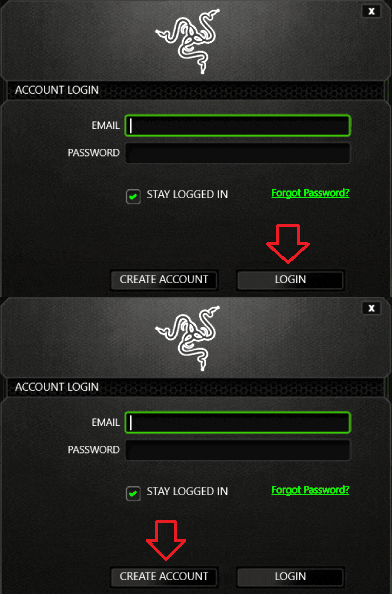 Some users don’t like to create an account, but without doing so, you will not be able to use and update the “Razer Synapse” software or use all the features of the device. Your device is compatible with “Razer Synapse 4” software. Download the software from the official website.

Software for Windows operating systems

Download “Razer Synapse 4” software
This software is only compatible with operating systems: Windows 11 and Windows 10 (64-bit). Mac operating system is not supported.
Keyboard model: Razer Huntsman V3 Pro Mini | RZ03-0499
Product name: Huntsman V3 Pro Mini
Model number: RZ03-0499
Product Code: RZ03-04990100-R3M1; RZ03-04990200-R3U1; RZ03-04990300-R3W1; RZ03-04990400-R3G1; RZ03-04990500-R3F1; RZ03-04990600-R3N1; RZ03-04991300-R3J1; RZ03-04991400-R3K1; RZ03-04991500-R3T1; RZ03-04991700-R3M1
How to fix “Razer Synapse 4” when it crashes or fails to start.
Follow the steps below to fix Razer Synapse 4 when it crashes or fails to start. Right-click on the Razer Central icon in the system tray. Click on “Log In”, and enter your registered RazerID or Guest account. Run “Razer Synapse 4” as administrator.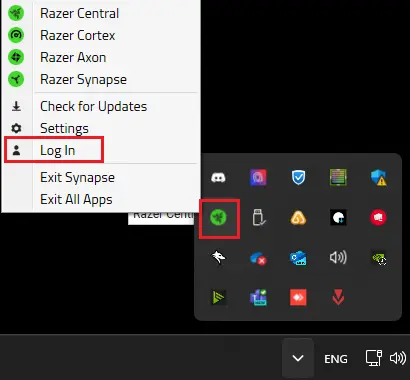 Run “Task Manager” if the issue persists. Go to “Services”. Check if the following services are running: Razer “Central Service”, Razer “Synapse Service”.
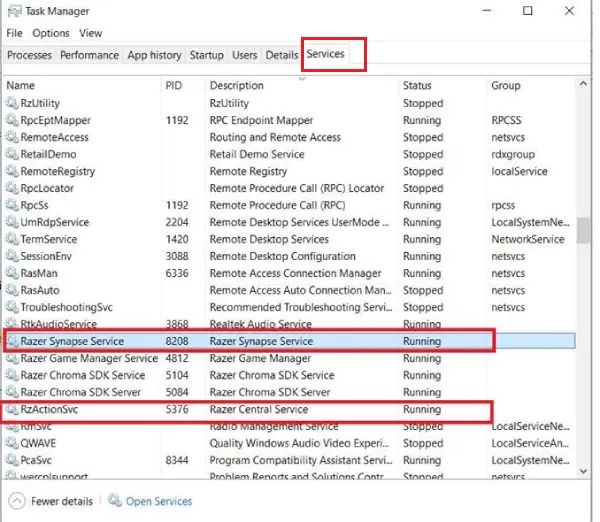 Right-click on “Razer Central Service”. Select “Start” or “Restart”. Do the same for “Razer Synapse Service”. If the issue persists, perform a clean reinstall of “Razer Synapse 4”.
If “Razer Synapse 4” fails to detect your Razer device.
Ensure the device is properly plugged in and connected directly to the computer and not through a USB hub. Ensure your Windows OS and “Razer Synapse 4” are updated. Restart your PC if this is your first time installing a Razer device or just completing an update.
Razer keyboards may not be as innovative as some of their other products, but the company is always trying different approaches to provide gamers with the most fully featured keyboards possible. Razer keyboards have an excellent reputation for quality, performance and a wide range of features. Many have a durable aluminum top plate or frame and feature the company’s proprietary switches.
Keyboard model: Razer Huntsman V3 Pro Mini | RZ03-0499
Product name: Huntsman V3 Pro Mini
Model number: RZ03-0499
Product Code: RZ03-04990100-R3M1; RZ03-04990200-R3U1; RZ03-04990300-R3W1; RZ03-04990400-R3G1; RZ03-04990500-R3F1; RZ03-04990600-R3N1; RZ03-04991300-R3J1; RZ03-04991400-R3K1; RZ03-04991500-R3T1; RZ03-04991700-R3M1


Leave a Reply