Last Updated on 15.11.2024 by DriverNew
 Driver for Windows 11, Windows 10, Windows 8, Windows 8.1, Windows 7, Windows Vista (64-bit / 32-bit)
Model: OKI ES5112 Printer
Drivers for OKI ES5112 printer. Download and install all necessary drivers and software. After installing this software, you will be able to use all the features of the OKI ES5112 printer.
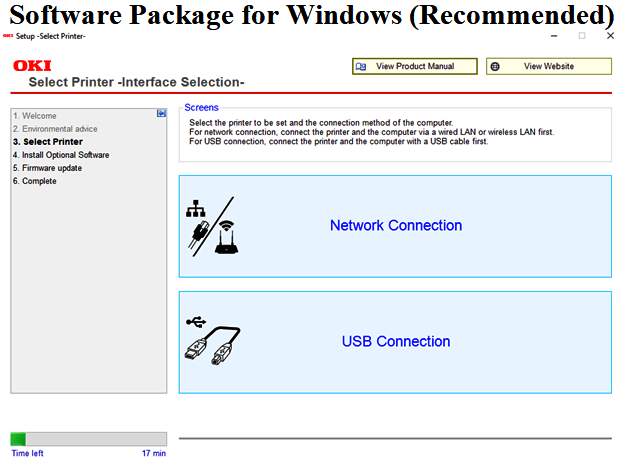
Software Package for Windows (Recommended)
You can install all the software such as drivers and utilities for using the printer at once.
Operating System: Windows 11; Windows 10 (64-bit / 32-bit); Windows 8.1 (64-bit / 32-bit); Windows 8 (64-bit / 32-bit); Windows Server 2022; Windows Server 2019; Windows Server 2016; Windows Server 2012 R2; Windows Server 2012
Category: Software package. Program Version: 2.0.0
Download printer driver for Windows (Recommended)
 INSTALLATION: Double-click on the downloaded file. if [User Account Control] is displayed, click Yes. Select your language from the pull-down menu of language selection in the [Welcome] screen. Read the software license agreement,and click [Accept]. Follow the steps on the window to install the software. Click [Exit]. Please use this software on a computer connected to the Internet.
Languages: English; German; Brazilian Portuguese; Czech; Danish; Dutch; Finnish; French; Greek; Hungarian; Italian; Japanese; Korean; Norwegian; Polish; Portuguese; Russian; Simplified Chinese; Spanish; Swedish; Traditional Chinese; Turkish.
If you have problems installing the printer driver, you can use a different version of the software (driver).
Driver for Windows 11, Windows 10, Windows 8, Windows 8.1, Windows 7, Windows Vista (64-bit / 32-bit)
How to install the printer driver correctly: Do not connect the printer to the computer. Start installing the software first. During the installation process, a message will appear on the monitor informing you when to connect the printer to your computer.
Video showing how to install the printer driver.
Software for Windows operating systems

Download printer driver for Windows
Printer Driver for OKI ES5112. This is a driver that will provide full functionality for your selected model.
Languages: English French Italian German Spanish Catalan Portuguese Japanese Dutch Danish Greek Polish Czech Hungarian Russian Turkish Arabic Hebrew
Software Package for Mac (Recommended)
Operating System: macOS 12; macOS 11; macOS 10.15; macOS 10.14; macOS 10.13; macOS 10.12; OS X 10.11; OS X 10.10; OS X 10.9
PCL5 Printer Driver. Category: Printing Driver. Program Version: 2.2.2
Download printer driver for Mac OS (Recommended)
OKI ES5112 INSTALLATION: Double click on the downloaded file icon for installation. The disk image will be mounted on a desktop. Launch the program by double clinking the icon in the disk image. Languages: Brazilian Portuguese; English; French; German; Italian; Japanese; Korean; Portuguese; Simplified Chinese; Spanish; Traditional Chinese


Leave a Reply