Last Updated on 10.10.2024 by DriverNew
 Drivers and software for operating systems Windows 11, Windows 10, Windows 8, Windows 8.1, Windows 7, Windows Vista (64-bit / 32-bit)
Printer Model: Canon Color imageCLASS MF8180c
There are several different drivers for the Canon Color imageCLASS MF8180c printer and many users do not know which drivers to choose to install. We recommend downloading a driver file called ‘MFDriver’.
This file contains all the necessary drivers for the Canon Color imageCLASS MF8180c printer and scanner. You don’t need any other drivers. If you don’t want to search for these drivers and software yourself, you can download them from the links on this page of the website. Driver downloads will be from the same links found on the Canon website.
How to install the printer driver correctly: Do not connect the printer to the computer. Start installing the software first. During the installation process, a message will appear on the monitor informing you when to connect the printer to your computer.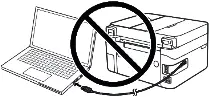 If you see the message ‘Found New Hardware’ on the screen, click Cancel and disconnect the USB cable. Then proceed to install the software. A common mistake when installing a driver is that you first connect the device to your computer using a USB cable and then install the driver. In this case, the operating system detects the connected device and installs its own driver, which may not work correctly or not work at all. However, some other devices may work fine with the driver installed by the operating system. Therefore, if there is a driver specially created for your device, then first start installing this driver and only then connect the device to the computer.

Download drivers and software for Windows (64-bit)
Download drivers and software for Windows (32-bit)
Canon Color imageCLASS MF8180c Printer and Scanner Drivers
Driver Version : UFR II Printer Driver – V20.05, Fax Driver – V8.05, ScanGear – V11.3
Installing the printer and scanner driver for Canon Color imageCLASS MF8180c. Download the file. When clicking [Run] on the file download screen (file is not saved to disk). If the User Account Control prompt is displayed, click [Yes], and then click [Run] on the subsequent Security Alert screen. The Setup Wizard will start. After the Setup Wizard has started, follow the instructions on the screen to perform installation.

Printer Model: Canon Color imageCLASS MF8180c
You can scan using free Windows tools or the NAPS2 app.
Windows Scan is a free app for Windows 11, Windows 10, and Windows 8.1 that you can download from the Microsoft Store and use to scan documents and pictures.
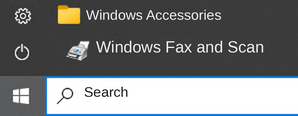
Windows Fax and Scan is a built-in app for Windows 10, 8.1, 8, and 7. To open it, click Start or use Windows Search. In the search box, type: Windows Fax and Scan.
NAPS2 is a free scanning app that lets you save files as PDF, TIFF, JPEG, or PNG and offers more flexible settings.
To learn more about these apps, which one to choose, and how to use them, read this article.
Important: These apps require a scanner driver. If a driver from the manufacturer is available for your model, it is best to install it first. If Windows has already installed a driver automatically and scanning works properly, reinstalling it is usually not necessary.
Printer Model: Canon Color imageCLASS MF8180c
If you cannot scan over a network or with a USB connection in Windows 10, Windows 8.1, Windows 8, install the MF driver, restart (not shut down) your PC, and then install the following program.
Patch for Network Scan, USB Scan
This patch resolves an issue that prevents scanning over a network or with a USB connection after upgrading Windows to a newer version. If you cannot scan over a network or with a USB connection, install this patch. If installing (or reinstalling) the MF driver, be sure to first restart (not shut down) your PC after driver installation is complete, and then install this patch. If you are using USB scan, be aware that it may cease functioning after any future upgrades to Windows. If this occurs, install this patch again. After installing this patch, if the message prompting you to restart your PC is displayed, restart (not shut down) your PC. If you do not restart your PC, this patch will not take effect.
Canon Color imageCLASS MF8180c



Leave a Reply