Last Updated on 29.10.2025 by DriverNew
 Driver for Windows 11, Windows 10, Windows 8, Windows 8.1, Windows 7, Windows Vista, Windows XP (64-bit / 32-bit)
OKI C3450 Printer Driver
Drivers for OKI C3450 printer. Download and install all necessary drivers and software. After installing this software, you will be able to use all the features of your OKI C3450 printer. If you have problems installing drivers or your printer is not working properly. Read here about how to solve these problems.

Software for Windows operating systems

Printer Driver for Windows (64-bit) Download
Printer Driver for Windows (32-bit) Download
OKI C3450 Printer Driver
Install the printer driver on Windows
Extract the driver
Open that folder and confirm you can see: …***.inf (.INF). Keep this window open — you’ll point Windows to this file. An example of what an .INF file might look like: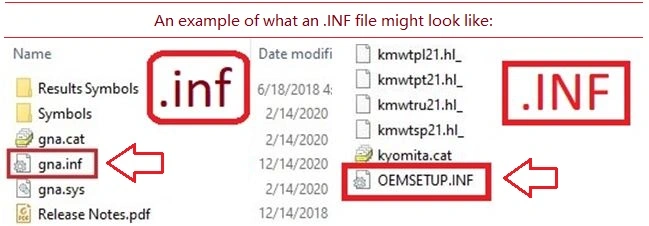
Connect and power on the printer
Plug the printer into your PC with USB. Turn the printer On and wait ~10–20 seconds. If Windows shows “Driver unavailable,” continue — the steps below will fix it.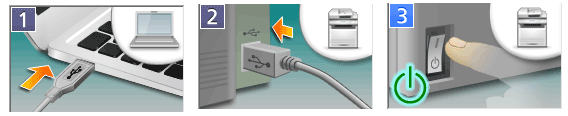
Open the classic Add-Printer wizard
Press Win + R, type control, press Enter to open Control Panel. Go to Hardware and Sound → Devices and Printers. Click Add a printer. If your printer isn’t listed, click The printer that I want isn’t listed.
Choose manual setup
Select Add a local printer or network printer with manual settings → Next. On Choose a printer port, select Use an existing port → pick USB001 (Virtual printer port for USB) → Next. (If printing doesn’t work later, you can switch to USB002 in Printer Properties → Ports.)
Install the printer driver with Have Disk
On Install the printer driver, click Have Disk… → Browse…. Navigate to the extracted folder and select: ***.inf → Open → OK. Select (file name) when it appears → Next. If asked to replace an existing driver, choose Replace the current driver → Next. Name the printer (write any name) → Next → Finish. Right-click your new printer → Printer properties → Print Test Page.
This video shows you how to install a printer driver on a Windows operating system.
If you don’t see file name extensions (.INF) when you view files in File Explorer
For Windows 10 operating system: If you don’t see the file extension (.inf): 1. In File Explorer, select “View” on the menu bar. 2. Click to enable “File Name Extensions”. For Windows 11 operating system: If you don’t see file name extensions (.INF) when you view files in File Explorer: In the search box on the taskbar, type file explorer, and in the search results, select File Explorer. In File Explorer, select View → Show → File name extensions.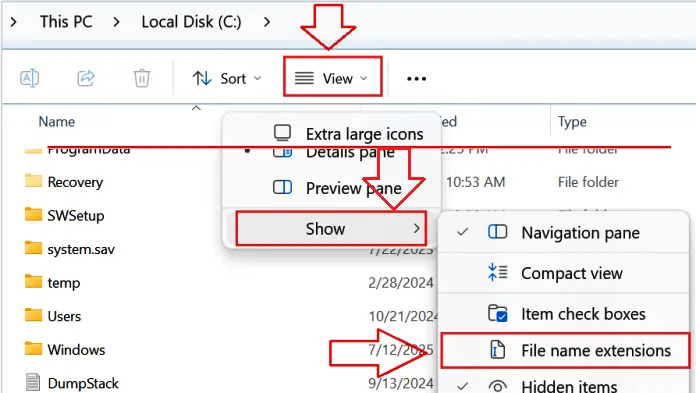
Quick fixes (only if it doesn’t print first try)
No print / “Offline”:
Right-click the printer → Printer properties → Ports → switch between USB001 and USB002 → Apply → test again.
Print Spooler hiccup:
Press Win + R → type services.msc → Enter → double-click Print Spooler → Restart → try a test page.
Why we recommend only this method
Right-clicking an .INF file to “Install” may add files to Windows, but it often doesn’t link the CAPT driver to the correct USB virtual port on Windows. The Have Disk method above sets everything up properly in one pass and is the most reliable approach for this printer.
Printer Driver for OKI C3450. This is a driver that will provide full functionality for your selected model.
OKI C3450 Printer Driver
Software Package for Mac OS (Recommended)
Operating System: macOS 12; macOS 11; macOS 10.15; macOS 10.14; macOS 10.13; macOS 10.12; OS X 10.11; OS X 10.10; OS X 10.9; OS X 10.8; OS X 10.7; Mac OS X 10.6; Mac OS X 10.5
Category: Printing Driver. Program Version: 2.0.5
This is a Hiper-C printer driver.
Download printer driver for Mac OS (Recommended)
For macOS 10.15 or later, be sure to apply the updater available under macOS 10.15 or later after installation. Some “Products” are not supported by the new OS.
OKI C3450 INSTALLATION: Double click on the downloaded file icon for installation. The disk image will be mounted on a desktop. Launch the program by double clinking the icon in the disk image. Only either CMYK or K can be specified for black printing. Please use [Setup] panel for duplex printing. If [True Black (K)] is specified at [Black Finish] in [Color] panel, it is not concerned with a setup of [Always create 100% Black (K) Toner] of the “Job Options” panel, but is always printed with a black (K) toner. Languages: English; French; German; Italian; Spanish
Printer Driver Updater (HIPER-C) for Mac OS
This update is for macOS 10.15 or later. The structure is as follows. (1) Contains an update module that enables the printer driver on macOS 10.15 or later.Please apply after installing printer driver. Installation requires computer administrator privileges. Please re-add the printer after updating the printer driver. After clicking the “Add” button, please do not press the “Configure” button on “Setting up the device” screen and wait until the operation is completed. (2) Contains the uninstaller for macOS 10.15 or later.
Operating System: macOS 12; macOS 11; macOS 10.15
Download Printer Driver Updater (HIPER-C)
OKI C3450 INSTALLATION: Click on the downloaded file. Follow the instructions on your computer screen to save the file to your hard disk. (Note the location where you saved the file.). Double click the downloaded file on your system. This will map a drive on the desktop containing the installer. Double click the installer(Printer Driver Updater.pkg) and follow the instructions. Re-add the printer after updating the printer driver. Using the uninstaller. Click on the downloaded file. Follow the instructions on your computer screen to save the file to your hard disk. (Note the location where you saved the file.). Double click the downloaded file on your system. This will map a drive on the desktop containing the installer. Double click the installer(Uninstaller). Follow the instructions on the screen to uninstall. Languages: Brazilian Portuguese; English; French; German; Italian; Japanese; Korean; Portuguese; Simplified Chinese; Spanish; Traditional Chinese
OKI C3450 Printer Driver



Thank you. The driver is installed and works well.