Last Updated on 20.11.2024 by DriverNew
 Drivers and software for operating systems Windows 11, Windows 10, Windows 8, Windows 8.1, Windows 7 (64-bit / 32-bit)
Printer Model: HP Smart Tank 515
Drivers for HP Smart Tank 515 printer and scanner. Download and install all necessary drivers and software. After installing this software, you will be able to use all the features of the HP Smart Tank 515 printer.
How to install the HP Smart Tank 515 printer driver correctly: Do not connect the printer to the computer. Start installing the software first. During the installation process, a message will appear on the monitor informing you when to connect the printer to your computer.
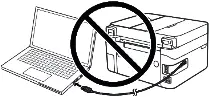
If you see the message ‘Found New Hardware’ on the screen, click Cancel and disconnect the USB cable. Then proceed to install the software. A common mistake when installing a driver is that you first connect the device to your computer using a USB cable and then install the driver. In this case, the operating system detects the connected device and installs its own driver, which may not work correctly or not work at all. However, some other devices may work fine with the driver installed by the operating system. Therefore, if there is a driver specially created for your device, then first start installing this driver and only then connect the device to the computer.

Software for Windows operating systems
Download drivers and software for Windows Windows 11, Windows 10, Windows 8, Windows 8.1, Windows 7 (64-bit / 32-bit) Download and install software for HP Smart Tank 515: drivers and software for printer and scanner. |

Software for MAC operating systems
Download drivers and software for MAC Download and install software for HP Smart Tank 515: drivers and software for printer and scanner. |

Installing drivers and software for printer and scanner: HP Smart Tank 515. Double-click the downloaded .exe file. It will be decompressed and the Setup screen will be displayed. Follow the instructions to install the software and perform the necessary settings.

After installing this software, you will be able to print, scan and use all printer features. You don’t need any other software.
HP Smart Tank 515
This is original software. Software installation is simple and fast. Start installing the software. During the installation process, a message will appear on the monitor informing you when to connect the printer to your computer. Therefore, prepare the printer for connection to the computer in advance.
Software for scanning documents and photos.
Use the ‘HP Scan’ software to scan documents and photos. This software will be installed along with printer and scanner drivers. On the Windows operating system, click the ‘Start’ button to find the shortcut for the ‘HP Scan’ software. A shortcut to this software may also be found on the desktop of the Windows operating system. This is software for scanning photos and documents, saving scanned documents to a computer or sending these documents by e-mail, and other functions.
HP Smart Tank 515
If you have problems using this software, you can use the easier way to scan documents and photos.
You can use free Windows tools for scanning.
In Windows 11, Windows 10, and Windows 8.1, the Windows Scan app is available. You can download it for free from the Microsoft Store and use it to scan documents and pictures.
In Windows 10 (version 1909 and earlier), as well as in Windows 8, 8.1, and 7, the built-in Windows Fax and Scan program may also be available and can be used for scanning. To open it, click Start or use Windows Search. In the search box, type: Windows Fax and Scan.
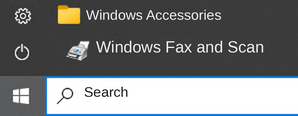
These programs require a scanner driver to work. You can read more here about scanning with built-in Windows tools.
HP Smart Tank 515



Thank you. The driver is installed and works well.
Thank you.
THANKS
WERY GOOD