Last Updated on 05.06.2020 by DriverNew
Download software for the device: Redragon K503 RGB LED Backlit Gaming Keyboard
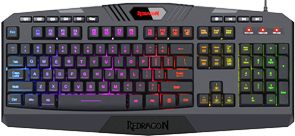 Device model: Redragon K503
RGB LED Backlit Gaming Keyboard
7-color RGB Backlighting and an ergonomic design with an oversized spacebar and comfortable wrist rest to minimize fatigue. The 112 keys Full-size keyboard offers quiet, crisp and precise key presses. It’s actually perfect for both the home and office.
Download Software for Redragon K503
 This is a driver that will allow you to use all the functions of your device. The version of this driver is located on the CD-ROM that is included with the device.



No solution yet??
Work for me, in 2023 lol
My Harpe 503 got a problem on SHIFT key, this drive just work fine for me and solve all my problems (Win10 64bits).
Thanks
Funny well didn’t work for me it just says “Device is not detected, the key settings can not be displayed!” Either it’s that you have a K553 and you didn’t see that it’s meant for the K503 model, or that it could be as it recommends that software needs to be installed and I don’t have them installed at all but I can’t see why they don’t just include it in the K503 installation package… tho we should not forget it is called “REDRAGON K553 RGB Driver” (K553 Hmm thought I came here for the K503)